How to cancel YouTube Premium (October 2026): web, Android, iPhone
In the US (as of 2026-10-18), YouTube offers Premium as individual monthly, pre-paid, family (up to 6 people) and student memberships (YouTube Help: Join YouTube Premium); check current US prices at youtube.com/premium, since we couldn't confirm them on an official page. To cancel YouTube Premium on a computer, go to youtube.com/paid_memberships, click Manage membership, click Deactivate, then Continue to cancel, pick a reason and click Yes, cancel (YouTube Help: Cancel YouTube Premium).
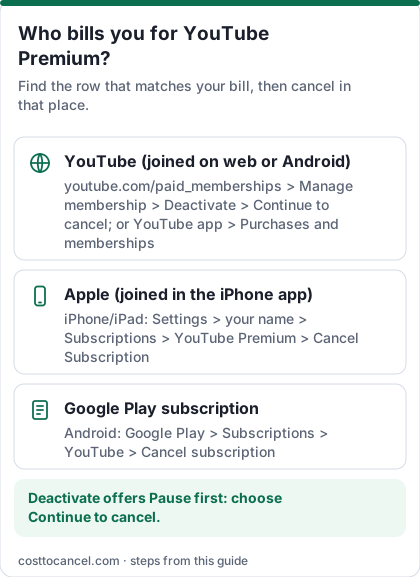
Your benefits continue until the end of the billing period. If you joined from the YouTube iOS app, Apple bills you; if through Google Play, cancel in Google Play.
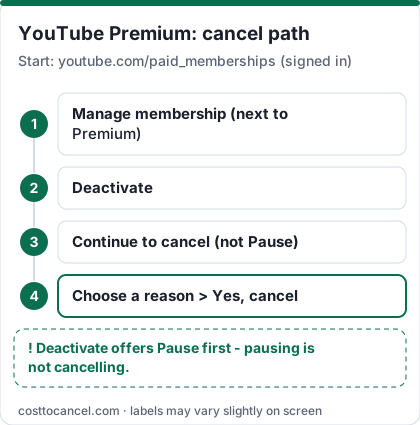
YouTube's cancel flow has a trap: the Deactivate button leads to a choice between pausing and cancelling. Pausing is not cancelling. If you want the charges to stop for good, pick Continue to cancel.
Where to cancel (who bills you)
| Who bills you | Where to cancel | Official help |
|---|---|---|
| YouTube directly (joined on the web or Android) | youtube.com/paid_memberships > Manage membership > Deactivate > Continue to cancel | YouTube Help: Cancel Premium |
| Apple (joined from the YouTube iOS app) | iPhone Settings > your name > Subscriptions > YouTube > Cancel Subscription | Apple: Cancel a subscription |
| Google Play (membership through a Google Play subscription) | On Android, open Subscriptions in Google Play > YouTube > Cancel subscription | Google Play Help |
How to cancel YouTube Premium
On a computer
- Go to youtube.com/paid_memberships.
- Click Manage membership.
- Click Deactivate.
- Click Continue to cancel (not pause).
- Select your reason for canceling and click Next.
- Click Yes, cancel.
In the YouTube app on Android
- Tap your profile picture, then Paid memberships.
- Tap the membership you want to cancel.
- Tap Continue to cancel.
- Select your reason and tap Next, then Yes, cancel.
If Apple bills you (joined in the iOS app)
- Open Settings on your iPhone or iPad and tap your name at the top.
- Tap Subscriptions.
- Tap YouTube.
- Tap Cancel Subscription (or Cancel Free Trial), then confirm.
If Google Play bills you
- On Android, open Subscriptions in Google Play (same Google Account that has the subscription).
- Select YouTube.
- Tap Cancel subscription and follow the instructions.
- Uninstalling the app does not cancel the subscription; you keep access for the time already paid (Google Play Help).
How to know it worked
You're done when:
- The Status field at youtube.com/paid_memberships shows the membership as cancelled, with the date benefits end. YouTube Help suggests this exact check.
- No new YouTube charge appears after that date.
YouTube says you won't be charged again unless you re-subscribe, and benefits continue until the end of the billing period.
If it didn't work
- There's no cancel option. You're probably billed by Apple (joined from the iOS app) or Google Play - use the matching row in the table above.
- You chose Pause by mistake. A paused membership isn't cancelled. Go back to youtube.com/paid_memberships and cancel from there.
- You're not sure it worked. Check the Status field on youtube.com/paid_memberships.
- A charge still appeared. It may be the current billing cycle, or a membership on a different Google Account - sign in with each account you use and check paid memberships.
- Pre-paid plans. YouTube says pre-paid plans don't renew automatically and can't be paused, so there's nothing to cancel - they simply run out.
What we verified
Verified on official YouTube Help pages (October 18, 2026): the computer and Android cancel steps and button names; the Apple and Google Play billing routes; the Status check; benefits continuing to the end of the billing period; membership types (individual monthly, pre-paid up to 24 months, family up to 6 people, two-person, student up to 4 years with annual verification); cancel, pause or resume being available.
Not verified - left out: all US dollar prices (youtube.com/premium didn't return prices to our checks, and we don't cite news reports for prices); price-increase dates; the higher in-app price on iPhone; pause durations; refunds; bundles with other Google plans.
Which YouTube membership do you have?
| Membership | Renews? | Notes from YouTube Help |
|---|---|---|
| Individual monthly | Yes, monthly | One user; no sharing |
| Pre-paid | No | Paid upfront, up to 24 months of access, can't be paused |
| Family | Yes | Up to 6 people in the family manager's household |
| Two-person | Yes | 2 people in the same household |
| Student | Yes | Full-time students at approved schools; up to 4 years, verified yearly |
Source: YouTube Help: Join YouTube Premium. Prices: youtube.com/premium.
Pause instead of cancelling
YouTube says paid members can cancel, pause or resume at any time. Pausing keeps your membership but stops it for a while; cancelling ends it. Pre-paid plans can't be paused. If you only need a break, Pause is the option shown next to Continue to cancel.
Family and two-person plans
If you manage a family or two-person plan, cancelling ends the benefits for everyone on it when the billing period ends. Tell members first, and remember that members don't pay - only the manager can cancel the plan.
Frequently asked questions
Does YouTube Premium charge a cancellation fee?
YouTube Help doesn't mention any cancellation fee. You can cancel at any time, and benefits continue until the end of the billing period.
How do I know my YouTube Premium is cancelled?
Check the Status field on youtube.com/paid_memberships.
I joined on my iPhone - why can't I cancel on YouTube?
If you joined from the YouTube iOS app, Apple bills you, so you cancel in your Apple account (Settings > your name > Subscriptions).
Does cancelling YouTube Premium cancel YouTube Music Premium?
They're separate memberships with the same cancel steps. Cancel each membership you see on youtube.com/paid_memberships.