Disney+ price (October 2026) and how to cancel Disney+
In the US (as of 2026-10-18), Disney+ costs $12.49/month (With Ads) or $21.49/month / $214.99/year (Premium, no ads on most titles) (Disney+). To cancel Disney+ when Disney+ bills you, go to disneyplus.com, select your profile, then Account, select your subscription under Subscription, and select Cancel Subscription (Disney+ Help: How to cancel).
You keep access until the end of the current subscription term. Disney does not refund or credit partially used periods. If a third party bills you, cancel with that partner.
Signing out or deleting the app does not cancel. The cancel button is on the plan that bills you - a standalone Disney+ plan, a Disney+/Hulu bundle, or a partner subscription.
Where to cancel (who bills you)
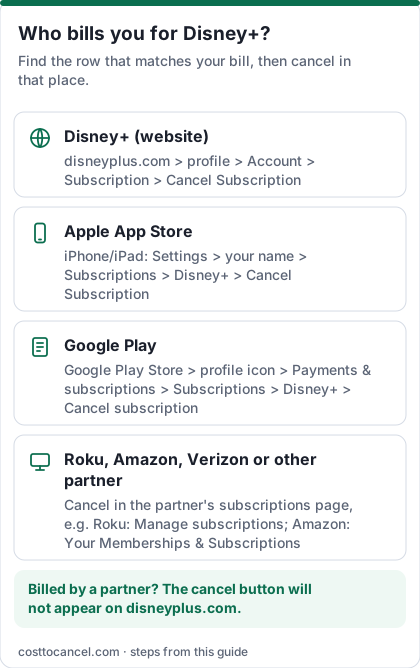
| Who bills you | Where to cancel | Official help |
|---|---|---|
| Disney+ directly | disneyplus.com > profile > Account > your subscription under Subscription > Cancel Subscription | Disney+ Help |
| Apple (App Store billing) | iPhone Settings > your name > Subscriptions > Disney+ > Cancel Subscription | Apple: Cancel a subscription |
| Google Play | Google Play > Subscriptions > Disney+ > Cancel subscription | Google Play Help |
| Other third-party partner (Roku, Amazon, Verizon and similar) | Account page shows the partner - cancel in that partner's subscriptions page or help center | Disney+ Help: third-party billing |
Disney+ price tiers (October 2026)
| Plan | Price (US) | What you get |
|---|---|---|
| Disney+ (With Ads) | $12.49/mo | Monthly only |
| Disney+ Premium | $21.49/mo or $214.99/yr | No ads on most titles; annual saves over 16% vs 12 months monthly |
| Disney+, Hulu Bundle (With Ads) | $12.99/mo | Both with ads; promo $11.99/mo for first 6 months on some offers |
| Disney+, Hulu Bundle Premium | $21.99/mo | Both without ads on most titles; promo $19.99/mo for first 6 months on some offers |
| Disney+, Hulu, ESPN Select Bundle | $21.99/mo with ads or $32.99/mo Premium | Adds ESPN Select |
| Disney+, Hulu, ESPN Unlimited Bundle | $35.99/mo with ads or $44.99/mo Premium | Full ESPN Unlimited |
| Disney+, Hulu, HBO Max Bundle | $21.99/mo with ads or $34.99/mo No Ads | Three services |
How to cancel Disney+
If Disney+ bills you
- Go to disneyplus.com and sign in (use a browser, not only the TV app).
- Select your profile, then Account.
- Under Subscription, select your Disney+ plan or bundle.
- Select Cancel Subscription and confirm.
- Check for the confirmation and note when access ends.
If Apple bills you
- Open Settings on your iPhone or iPad and tap your name at the top.
- Tap Subscriptions.
- Tap Disney+.
- Tap Cancel Subscription (or Cancel Free Trial), then confirm.
If Google Play bills you
- On Android, open Subscriptions in Google Play (same Google Account that has the subscription).
- Select Disney+.
- Tap Cancel subscription and follow the instructions.
- Uninstalling the app does not cancel the subscription; you keep access for the time already paid (Google Play Help).
If another partner bills you
- On your Disney+ Account page, note the billing partner.
- Cancel in that partner's subscriptions page (for example Roku or Amazon).
- Disney+ Help says it cannot cancel a partner-billed plan for you.
How to know it worked
You're done when:
- Your Account page shows the subscription as cancelled (or no longer set to renew), with the date access ends.
- Disney emailed a confirmation to the address on the account.
- You are not charged after that date.
You keep streaming until the end of the current term. Source: Disney+ Help; Subscriber Agreement.
If it didn't work
- No Cancel Subscription button. A third party bills you - use the matching row in the table above.
- You only signed out or deleted the app. That does not cancel. Use Account > Subscription.
- You're in a bundle and only wanted to drop Disney+. Cancelling the bundle ends every service in it. Switch to a standalone plan first if you want to keep Hulu or ESPN.
- You expected a partial-month refund. Disney's Subscriber Agreement says you do not get a prorated refund when you cancel; you keep access until the term ends (Subscriber Agreement).
- You bought through Apple or Google and want a refund. Request it from Apple or Google, not Disney.
What we verified
Verified on official Disney pages (October 18, 2026): US standalone and bundle prices on Disney+; cancel path (profile > Account > Subscription > Cancel Subscription) and continued access to end of term on Disney+ Help; no prorated refund on cancel in the US Subscriber Agreement; Apple and Google Play as third-party billing routes (Disney+ Help third-party / cancel articles); pause available only for monthly plans billed by Disney+.
Not verified - left out: the exact October 21, 2026 existing-subscriber increase date (stated on Hulu Help for Hulu, not on the Disney+ pages we could load from this location); partner-specific cancel menus for every cable or phone offer; Singapore-locale help wording that differs from the US.
Pause instead of cancelling
Disney+ Help says that if you have a monthly subscription billed by Disney+, you can pause from the same Account > Subscription screen: choose Pause Subscription, pick a length, then confirm. The pause starts on the first day of the next billing period; you keep watching until then, and you are not charged during the pause. Third-party-billed plans cannot use Disney+'s pause - contact the partner. Source: Disney+ Help.
Bundle, standalone or a break
- You watch both Disney+ and Hulu most weeks: compare the bundle price with two standalone plans on Disney's plans page before you cancel.
- You only want one franchise or one new season: keep that one service for a month, then cancel.
- You're choosing between Disney+ and Netflix: list what you'll watch in the next 30 days - see Netflix.
- You want live sports every day: compare an ESPN Unlimited bundle with YouTube TV.
The cancel button is on the plan you pay for, and the bill comes from whoever the Account page lists.
Refunds
Disney does not refund or credit partially used periods when you cancel (Help; Subscriber Agreement). For App Store or Google Play charges, use Apple's or Google's refund tools.
Frequently asked questions
Can I cancel Disney+ any time?
Yes. Disney+ Help says you can cancel any time, effective at the end of the current subscription term. There is no cancellation fee listed.
I cancelled a bundle - do I lose Hulu too?
Yes. Cancelling the bundle ends every included service. To keep one, switch to that standalone plan instead of cancelling everything.
Does Disney+ refund unused months on the annual plan?
Disney's Subscriber Agreement says you do not get a prorated refund when you cancel; you keep access until the end of the term.
Why is there no cancel button?
A third party bills you. Check Payment Information / Subscription on your Account page and cancel with that partner.