Netflix price (October 2026) and how to cancel
In the US (as of 2026-10-18), Netflix costs $8.99/month (Standard with ads), $19.99/month (Standard) or $26.99/month (Premium) - US list prices from Netflix Help: Plans and Pricing. To cancel Netflix, go to the Manage your membership page, select Cancel, then select Finish Cancellation; Netflix emails a confirmation and you can keep watching until the end of your billing period (Netflix Help: How to cancel Netflix).
Netflix doesn't list any cancellation fee and doesn't offer annual plans. If you don't see a cancel option, a payment partner bills you. Netflix keeps your viewing activity and account details for 24 months after you leave.
Signing out or deleting the Netflix app does not cancel anything - Netflix says the Manage your membership page is the only way to cancel. The good news is that leaving is low-risk: Netflix keeps your history for 24 months, so rejoining for one new season is a real option.
Where to cancel (who bills you)
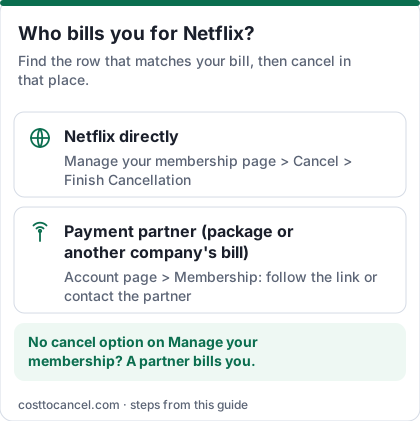
| Who bills you | Where to cancel | Official help |
|---|---|---|
| Netflix directly (card, PayPal or gift card on your Netflix account) | Manage your membership page > Cancel > Finish Cancellation | Netflix Help: How to cancel |
| Payment partner (Netflix through a package or another company's bill) | Account page > Membership section: follow the link there, or contact the partner as instructed | Netflix Help: If you don't see an option to cancel |
Netflix price tiers (October 2026)
| Plan | Price (US) | What you get |
|---|---|---|
| Standard with ads | $8.99/mo | Ads; 1080p; 2 devices at a time; most titles |
| Standard | $19.99/mo | Ad-free; 1080p; 2 devices; can add 1 extra member |
| Premium | $26.99/mo | Ad-free; 4K + HDR; 4 devices; up to 2 extra members; spatial audio |
| Extra member | $7.99/mo with ads or $9.99/mo without | Someone outside your household, paid by you |
How to cancel Netflix
If Netflix bills you
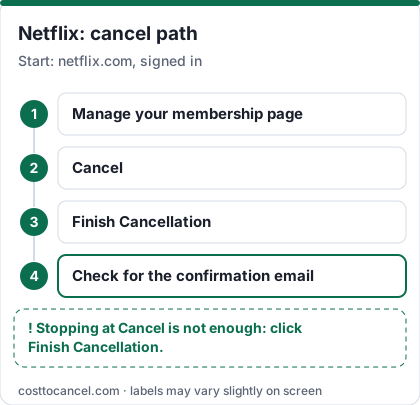
- Go to the Manage your membership page on netflix.com (sign in if asked).
- Tap or click Cancel.
- Under Cancel, tap or click Finish Cancellation.
- Check for the confirmation email sent to the address on the account.
If you don't see a cancel option
- Go to your Account page and look under Membership.
- Follow the link there, or the instructions to contact your payment partner, and cancel with them.
If you only want a break
- Go to the Cancel Membership page.
- Select Pause for 1 Month instead of finishing the cancellation.
How to know it worked
You're done when:
- You've clicked Finish Cancellation (stopping at Cancel isn't enough) and received the confirmation email.
- Your Account page shows when your membership ends - Netflix's Terms say you can see that date there.
- You aren't charged on your next billing date. Netflix says you won't be charged again unless you restart your account.
Source: Netflix Help: How to cancel Netflix.
If it didn't work
- No cancel option on the Manage your membership page. A payment partner bills you. Look under Membership on your Account page for the link or instructions.
- You signed out or deleted the app. That doesn't cancel. Use the Manage your membership page.
- Someone in your household restarted it. After cancelling, Netflix recommends changing your password and ticking Sign out of all devices.
- You have a gift card or promo balance. You can keep using Netflix after cancelling until that balance runs out.
- You're switching to a package that includes Netflix. You don't need to cancel - link your existing account to the package and Netflix stops billing your payment method.
- You expected a refund. Netflix's Terms say payments are nonrefundable and there are no refunds or credits for partially used periods (Terms of Use 2.8).
What we verified
Verified on official Netflix pages (October 18, 2026): US prices and plan features; monthly-only billing and the discontinued Basic plan; the cancel path (Manage your membership > Cancel > Finish Cancellation) and the confirmation email; payment-partner cancellation; watching until the end of the billing period; pause rules; 24-month retention of viewing activity, recommendations, ratings, account details and game data; no refunds for partial periods (Terms 2.8); cancellation taking effect at the end of the billing period (Terms 2.6).
Not verified - left out: price-increase dates (the old version cited a news report); which phone or TV providers bundle Netflix; Apple billing for older accounts (Netflix's cancel page doesn't list Apple, so we folded it into payment partners); in-app menu labels.
What happens after you cancel
- You can keep watching until the end of your billing period.
- Netflix keeps your viewing activity for 24 months after the account closes, along with recommendations, ratings, account details, gameplay history and game saves (for games without cloud saves, the game and data must still be on the device).
- Rejoin any time within 24 months and you pick up where you left off (Netflix Help).
Pause instead of cancelling
Netflix lets you pause for 1 month from the Cancel Membership page: you keep watching until your next billing date, aren't charged on it, and billing resumes after a month. A week before it unpauses you can extend by one more month, up to 3 months in total. Netflix says pausing isn't available on the Basic plan or for some payment methods such as Direct Debit, gift cards and some partner payments (Netflix Help).
Netflix or Disney+ this month?
If you're cutting back to one streaming service, decide by what you'll actually watch in the next 30 days, not by the library in general:
- List the shows and films you plan to watch in the next month.
- If most of them are on one service, keep that one and cancel the other - both let you keep watching until your paid period ends.
- If both lists are short, cancel both and rejoin when a specific show arrives. Netflix keeps your history for 24 months.
Compare current Disney+ plans and steps in our Disney+ price and cancel guide.
Frequently asked questions
Can I cancel Netflix any time?
Yes. There is no contract, and Netflix doesn't list any cancellation fee. You can cancel any day and keep access until the end of the current billing period.
Why can't I find the Cancel button?
If you don't see a cancel option, you're billed by a payment partner. Look under Membership on your Account page for a link or instructions to contact the partner.
Is there still a Netflix Basic plan?
No. Netflix says the Basic plan has been discontinued. The cheapest US plan is Standard with ads at $8.99 a month.
Will my profiles be deleted?
Not right away. Netflix says it keeps your viewing activity, recommendations, ratings and account details for 24 months after the account closes, so you can rejoin and pick up where you left off.
Does Netflix charge a cancellation fee?
No. Netflix doesn't list any cancellation fee, and there is no contract. Its Terms of Use say you can cancel at any time from your Account page and the cancellation takes effect at the end of your billing period, so you keep watching until then. Netflix doesn't refund partially used periods. If a partner bills you, you may need to cancel with that partner. Sources: Netflix Help: How to cancel Netflix; Netflix Terms of Use (sections 2.6 and 2.8).