Microsoft 365 price (October 2026) and how to cancel
In the US (as of 2026-10-18), Microsoft lists Microsoft 365 Personal at $9.99/month or $99.99/year, Family at $12.99/month or $129.99/year, and Premium at $199.99/year (US list prices before tax, from Microsoft: Compare Microsoft 365 plans). To stop Microsoft 365 renewing, sign in at account.microsoft.com/services, select Manage next to the subscription, choose Turn off recurring billing and follow the prompts; you keep access until the expiry date (Microsoft Support: Turn recurring billing on or off).
To ask for money back instead, choose Manage > Cancel: Microsoft checks refund eligibility automatically during cancellation (Microsoft subscription refund policy). If Apple, Google Play or a retailer sold it, cancel with them.
Microsoft gives you two different buttons, and they do different things. Turn off recurring billing just stops the next renewal and leaves everything working until the expiry date. Cancel is the route to a refund when you're inside Microsoft's refund window. Pick the one that matches what you want before you start.
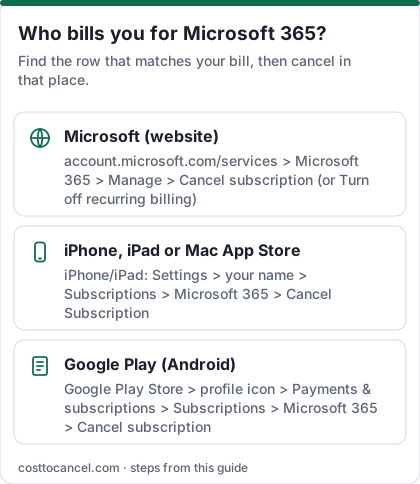
Where to cancel (who bills you)
| Who bills you | Where to cancel | Official help |
|---|---|---|
| Microsoft directly (card on your Microsoft account) | account.microsoft.com/services > Manage > Turn off recurring billing (or Cancel for a refund) | Turn recurring billing on or off |
| Apple App Store | iPhone Settings > your name > Subscriptions > Microsoft 365 > Cancel Subscription; refunds through Apple | Apple: Cancel a subscription |
| Google Play | On Android, open Subscriptions in Google Play > Microsoft 365 > Cancel subscription; refunds through Google Play | Google Play Help |
| Retailer (for example Amazon or Best Buy) or a prepaid code | Contact the retailer; prepaid codes follow the retailer's return policy | Microsoft: Unable to cancel your subscription |
Microsoft 365 US prices (verified October 2026)
| Plan | Price (US) | What you get |
|---|---|---|
| Microsoft 365 Personal | $9.99/mo or $99.99/yr | 1 person, 1 TB cloud storage, desktop apps with Copilot |
| Microsoft 365 Family | $12.99/mo or $129.99/yr | 1 to 6 people, 2 TB shared storage (AI for the owner only) |
| Microsoft 365 Premium | $199.99/yr | Family features plus extensive Copilot usage; monthly price not shown on the page we checked |
| Office Home 2024 | One-time purchase - check official pricing | 1 PC or Mac, no subscription |
How to cancel Microsoft 365
Stop the next renewal (Microsoft billing)
- Sign in at account.microsoft.com/services with the Microsoft account that bought the subscription.
- Find your subscription and select Manage.
- Select Turn off recurring billing. (No such button means it already ends on the Expires on date shown.)
- Read the details, then select I don't want my subscription and finish the prompts.
- You keep the subscription and its benefits until it expires.
Cancel for a refund (Microsoft billing)
- Sign in at account.microsoft.com/services and open Services & subscriptions.
- Select the subscription, then Manage > Cancel.
- Microsoft shows whether you qualify for a refund and guides you through the rest.
If Apple bills you
- Open Settings on your iPhone or iPad and tap your name at the top.
- Tap Subscriptions.
- Tap Microsoft 365.
- Tap Cancel Subscription (or Cancel Free Trial), then confirm.
If Google Play bills you
- On Android, open Subscriptions in Google Play (same Google Account that has the subscription).
- Select Microsoft 365.
- Tap Cancel subscription and follow the instructions.
- Uninstalling the app does not cancel the subscription; you keep access for the time already paid (Google Play Help).
How to know it worked
You're done when:
- Services & subscriptions shows Expires on [date] or Turn on recurring billing instead of a next-charge date - Microsoft says the second one means recurring billing is already off.
- If you chose Cancel and qualified, the refund appears on the cancellation screen.
- For Apple or Google Play, the subscription shows as cancelled in that store.
If it didn't work
- No cancel or recurring-billing option. Microsoft says to check who sold it (retailer, Apple, Google Play), check that you're signed in with the account that bought it, and check that your payment card hasn't expired - you can't cancel while money is owed.
- Charged anyway. Microsoft says cancellations must be made more than 2 days before the billing date; otherwise the charge goes through. Check the end date in Services & subscriptions.
- Charge you don't recognise. It may be on a different Microsoft account; use the Manage your payments page in your Microsoft account to investigate.
- Work or school account. Contact your organisation's IT admin.
What we verified
Verified on official Microsoft pages (October 18, 2026): US prices for Personal, Family and Premium (annual); the Turn off recurring billing path and its wording; the Cancel route and automatic refund check; the 30-day refund window and the once-per-product refund of a recent renewal; no prorated refunds in the US for Personal and Family; the 14-day prorated window for Premium; the "more than 2 days before billing" rule; what happens when a subscription expires.
Not verified - left out: Premium's monthly price and Microsoft 365 Basic pricing; "Classic" plans without Copilot (Microsoft's pages we checked don't describe them, so we no longer mention them); retailer refund terms.
Refund rules (US)
| Situation | What Microsoft's refund policy says |
|---|---|
| Within 30 days of initial purchase, or before your first recurring billing date (whichever is sooner) | Refund in most cases, by cancelling |
| Within 30 days after a recurring payment | Refund of that most recent charge - once per Microsoft account, per subscription product |
| Personal, Family, Basic later than that (US) | Prorated refunds are not available |
| Premium (US) | Prorated refund if you cancel within 14 days of initial purchase |
| Bought from Apple, Google Play or a retailer | That company's refund policy applies |
Source: Microsoft subscription refund policy. If no refund is issued, access usually continues to the end of the billing period.
What happens when it expires
Microsoft says your account (and anyone you share with) reverts to a free account and you don't lose data, but:
- Office apps stay installed and enter Reduced Functionality Mode: you can open, view and usually print, but not create, edit or save. Office on the web stays free.
- OneDrive drops to the free 5 GB. If you're over it, existing files become read-only; after three months over the limit the account is frozen, and after six months Microsoft might delete the files.
- Outlook.com stays active, but over the storage quota you can't send or receive email.
Source: What happens when your Microsoft 365 subscription expires. Download or trim OneDrive before your expiry date.
Cheaper alternatives
- Office on the web with a free Microsoft account for occasional editing.
- Office Home 2024, a one-time purchase for 1 PC or Mac, if you don't need the cloud storage.
- Free suites such as Google Docs and LibreOffice.
Frequently asked questions
Will I lose my files if I cancel Microsoft 365?
No, Microsoft says you don't lose data. But if your OneDrive is over 5 GB the files become read-only, and staying over the limit for months can lead to the account being frozen and later deleted.
Does Microsoft charge a cancellation fee for Microsoft 365?
Microsoft's help pages don't mention a cancellation fee for home plans. Turning off recurring billing simply lets the subscription expire on its date.
Can I get a refund on an annual renewal?
Yes, once per product: Microsoft refunds your most recent recurring charge if you cancel within 30 days after that payment.
Can I share Microsoft 365 Family?
Yes, with up to 5 other people (1 to 6 in total). AI features stay with the subscription owner.