ChatGPT Plus price (October 2026) and how to cancel
In the US (as of 2026-10-18), ChatGPT Plus is $20/month (OpenAI Help: What is ChatGPT Plus?); Pro plans are $100, $200 or $500/month (OpenAI Help: Pro tiers). To cancel a subscription bought on chatgpt.com, sign in, open Settings, select Billing, then under Cancel plan select Cancel (OpenAI Help: Canceling your ChatGPT subscription).
Cancel at least 24 hours before the next billing date. Paid features stay until the end of the current period. Uninstalling the app does not cancel.
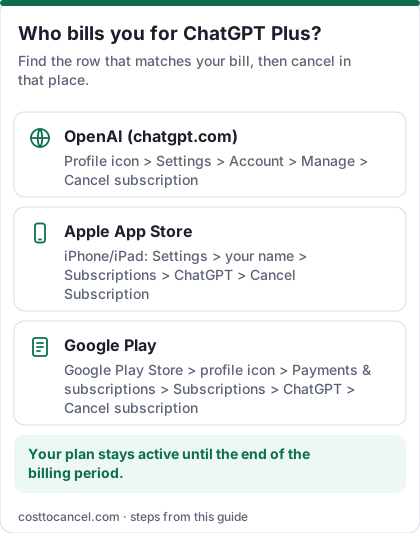
OpenAI bills Plus on the platform where you subscribed. A web plan will not show up under Apple or Google Play, and an App Store plan will not cancel from chatgpt.com Settings.
Where to cancel (who bills you)
| Who bills you | Where to cancel | Official help |
|---|---|---|
| chatgpt.com (OpenAI) | Settings > Billing > under Cancel plan, select Cancel | OpenAI Help |
| Apple App Store | iPhone Settings > your name > Subscriptions > ChatGPT > Cancel Subscription | OpenAI Help / Apple |
| Google Play | Play Store > Subscriptions > ChatGPT > Cancel subscription | OpenAI Help |
| ChatGPT Business (self-service) | Workspace settings > Billing > Manage plan > Cancel subscription | OpenAI Help |
ChatGPT Plus price tiers (October 2026)
| Plan | Price (US) | What you get |
|---|---|---|
| ChatGPT Plus | $20/mo | Higher limits and tools than Free; billed monthly |
| ChatGPT Pro 100 | $100/mo | Pro models and higher limits |
| ChatGPT Pro 200 | $200/mo | More usage than Pro 100 |
| ChatGPT Pro 500 | $500/mo | Highest included usage; Ultrafast included |
How to cancel ChatGPT Plus
If you subscribed on chatgpt.com
- Sign in at chatgpt.com.
- Open your account menu and select Settings.
- Select Billing.
- Under Cancel plan, select Cancel.
- Confirm. Cancel at least 24 hours before the next billing date.
If Apple bills you
- Open Settings on your iPhone or iPad and tap your name at the top.
- Tap Subscriptions.
- Tap ChatGPT.
- Tap Cancel Subscription (or Cancel Free Trial), then confirm.
- Deleting your ChatGPT account does not cancel an Apple subscription - cancel in Settings first.
If Google Play bills you
- On Android, open Subscriptions in Google Play (same Google Account that has the subscription).
- Select ChatGPT.
- Tap Cancel subscription and follow the instructions.
- Uninstalling the app does not cancel the subscription; you keep access for the time already paid (Google Play Help).
If you have self-service ChatGPT Business
- Sign in to ChatGPT and open Workspace settings.
- Select Billing, then Manage plan, then Cancel subscription.
- If you cannot see billing settings, ask the workspace owner.
How to know it worked
You're done when:
- The platform that billed you no longer shows the plan set to renew (check Billing on chatgpt.com, or Subscriptions in Apple / Google Play).
- You cancelled at least 24 hours before the next billing date so the next charge does not process.
Paid features remain until the end of the current billing period after an ordinary cancellation. Source: OpenAI Help.
If it didn't work
- No Cancel option on chatgpt.com. Apple or Google may bill you - cancel in that store. Or you are signed into a different ChatGPT account than the one that paid.
- You only uninstalled the app. OpenAI Help says that does not cancel the subscription.
- Charged after you cancelled. You may have cancelled less than 24 hours before renewal, or you have a second subscription on another platform or account.
- You deleted the ChatGPT account hoping to stop Apple billing. Deleting the account does not cancel App Store subscriptions - cancel with Apple first.
- Duplicate web + store subscriptions. Cancel the one you do not want on its own platform (OpenAI Help).
What we verified
Verified on official OpenAI Help (October 18, 2026): Plus at $20/month (What is ChatGPT Plus?); Pro 100/200/500 prices (Pro tiers); cancel paths for chatgpt.com (Settings > Billing > Cancel plan), Apple, Google Play and Business (Canceling your ChatGPT subscription); cancel at least 24 hours before renewal; uninstalling the app does not cancel; cancellation does not automatically refund; no annual billing for Go/Plus/Pro (Go, Plus, Pro articles).
Not verified - left out: ChatGPT Go's dollar price (Help points to the JS pricing page without stating a number in the article body); iOS App Store price differences; EU 14-day refund details beyond the linked refund article.
Refunds
Cancellation stops future renewals but does not automatically refund past charges (OpenAI Help). For chatgpt.com or Google Play purchases, request a refund through OpenAI Support while signed in to the account that was charged. For App Store purchases, request a refund from Apple.
Go, Plus or Pro
Plus is the common individual upgrade at $20/month. Pro adds higher limits at $100, $200 or $500/month. Go is OpenAI's lower-cost paid plan with higher limits than Free - see What is ChatGPT Go? and the in-product pricing page for the current price. You can change or cancel from the same billing settings on the platform that bills you.
Frequently asked questions
Do I lose my chats if I cancel?
OpenAI Help does not say chats are deleted when you cancel. You return to Free limits after the paid period ends; keep the same account to keep history.
Can I pay yearly for Plus?
No. OpenAI Help says Go, Plus and Pro do not support annual billing.
Does uninstalling ChatGPT cancel Plus?
No. Cancel on chatgpt.com, Apple or Google Play - whichever billed you.
I was charged twice - web and App Store.
Cancel the subscription you do not want on its own platform. Refunds are separate - see OpenAI's refund help article.