Amazon Prime price (October 2026) and how to cancel Prime
In the US (as of 2026-10-18), Amazon lists Prime at $14.99/month or $139/year, and Prime Video membership at $8.99/month (US list prices before tax, from Amazon: The Amazon Prime Membership Fee). To cancel Amazon Prime, go to Your Prime Membership page, select Update, cancel, and more, then choose to cancel and follow the prompts to the final confirmation (Amazon Help: Cancel Your Amazon Prime Membership).
Paid members who haven't used their benefits are eligible for a full refund of the current period, processed in three to five business days. If you signed up through Google Play, cancel there; if another company provides Prime, contact them.
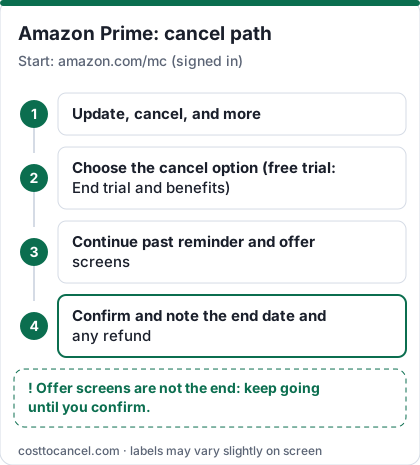
Amazon's cancel flow shows several reminder and offer screens. Keep going until Amazon shows the date your membership ends - that confirmation, not the first click, is what stops the next charge.
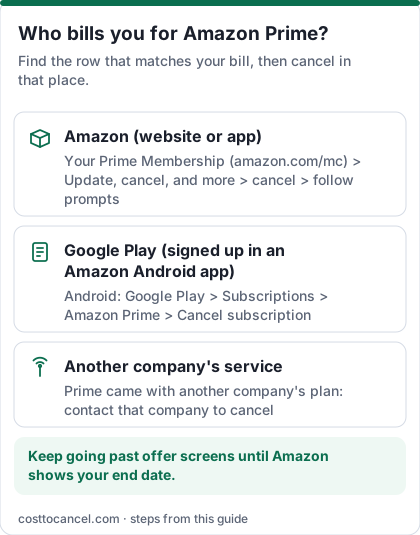
Where to cancel (who bills you)
| Who bills you | Where to cancel | Official help |
|---|---|---|
| Amazon directly (card on your Amazon account) | Your Prime Membership > Update, cancel, and more > cancel > follow prompts | Amazon: Cancel Your Prime Membership |
| Google Play (signed up in the Amazon Shopping or Prime Video Android app) | On Android, open Subscriptions in Google Play (or Settings > Google > Manage your Google Account > Payments & subscriptions > Manage subscriptions) > select the Amazon subscription > Cancel subscription | Google Play: Cancel a subscription |
| Another company (for example a phone or internet plan that includes Prime) | Contact that company to cancel or change the membership | Amazon: Cancel Your Prime Membership |
Amazon Prime price tiers (October 2026)
| Plan | Price (US) | What you get |
|---|---|---|
| Prime monthly | $14.99/mo | Shipping, Prime Video and other Prime benefits |
| Prime annual | $139/yr | Same benefits, about $41 less than 12 monthly payments (our arithmetic) |
| Prime Video membership | $8.99/mo | Video without shipping benefits |
| Prime for Young Adults | $7.49/mo or $69/yr | Eligible young adults (amazon.com/joinyoungadult) |
| Prime Access | $6.99/mo | EBT, Medicaid, SNAP and other qualifying government-assistance recipients |
How to cancel Amazon Prime
On the website
- Go to Your Prime Membership and sign in.
- Select Update, cancel, and more.
- Choose the cancel option (Amazon's help names it Cancel Membership; a free trial shows End trial and benefits).
- Continue past the reminder and offer screens.
- Confirm, and note the end date and any refund Amazon shows.
In the Amazon app
- Tap the profile icon, then Your Account.
- Open Prime membership (or Manage Prime membership).
- Choose the option to cancel your membership and follow the prompts to the final confirmation.
If Google Play bills you (signed up in the Amazon Shopping or Prime Video Android app)
- On your Android device, open Subscriptions in Google Play, signed in to the Google Account that has the subscription (another route: Settings > Google > Manage your Google Account > Payments & subscriptions > Manage subscriptions).
- Select the Amazon Prime subscription.
- Tap Cancel subscription and follow the instructions.
- Uninstalling the app does not cancel the subscription; you keep access for the time already paid (Google Play Help).
How to know it worked
You're done when:
- Amazon shows a screen confirming your membership will end (or has ended), with a date.
- Your Prime Membership page no longer shows a next payment date.
- If you were eligible for a refund, it arrives on your original payment method; Amazon says it processes refunds in three to five business days.
For Google Play billing, the proof is the Amazon subscription showing as cancelled in Play Store > Payments & subscriptions.
If it didn't work
- You can't find the cancel option. Amazon's help offers a fallback: Customer Service homepage > Something else > I need help with something else.
- Your Prime comes from another company. Amazon can't cancel it - contact that company.
- You were charged after starting to cancel. You probably stopped at an offer screen. Re-open Your Prime Membership and check for a next payment date.
- No refund, or a partial one. Under Amazon's Prime Terms, outside the first 3 business days a full refund only applies if no one on your account made eligible purchases or used Prime benefits since the latest charge. Amazon's switch-membership help says used memberships are refunded pro rata on remaining full months.
- You want a monthly membership to end immediately. Amazon says to contact customer service.
What we verified
Verified on official Amazon pages (October 18, 2026): US prices for Prime, Prime Video, Young Adults and Prime Access; the cancel path (Your Prime Membership > Update, cancel, and more); the refund rule for unused benefits and the three-to-five business day processing time; the 3-business-day rule in the Prime Terms; pro rata refunds on remaining full months; Google Play and third-party billing routes; Prime Video channel subscriptions continuing after Prime ends.
Not verified - left out: exact button wording in the mobile app (it changes); Prime Video ad-free add-on prices; whether a pause option is offered (Amazon doesn't document one on the pages we checked); an Apple billing route for Prime (Amazon's cancel help lists only Google Play and other companies, so we removed it).
Refund rules
| When you cancel | What Amazon's terms say |
|---|---|
| Within 3 business days of signing up or converting from a free trial | Full refund, minus the value of Prime benefits used in that period |
| Any other time, no eligible purchases or benefits used since the latest charge | Full refund of the membership fee |
| Benefits already used | Pro rata refund based on the remaining full months (for example on an annual plan) |
| Free trial | Cancel before it ends with End trial and benefits and you pay nothing |
Sources: Amazon Prime Terms, Amazon: Switch Prime Membership.
Things to sort out before cancelling
- Prime Video channels (Paramount+ and others) continue after Prime ends - cancel them under Memberships & Subscriptions.
- Subscribe & Save orders keep coming without Prime shipping.
- Household sharing: people in your Amazon Household lose the benefits you share.
Alternatives
Prime Video membership ($8.99/month) is enough if you only want the streaming. For shipping, compare Amazon's free-shipping minimum and other retailers' memberships on their official pages.
Frequently asked questions
Can I cancel Prime and still get a refund?
Yes, if no one on your account used Prime benefits since your last charge, Amazon refunds the full current period. If benefits were used, Amazon may refund pro rata based on remaining full months.
Does Amazon charge a fee to cancel Prime?
No cancellation fee is mentioned in Amazon's Prime help or terms. You can cancel any time before your renewal date to avoid the next charge.
Does cancelling Prime cancel Kindle Unlimited, Audible or Prime Video channels?
No. Amazon says Prime Video subscriptions continue once Prime ends; cancel each subscription separately.
Is there a cheaper Prime for students?
Amazon lists Prime for Young Adults at $7.49 a month or $69 a year in the US (as of October 18, 2026).