Spotify Premium price (October 2026) and how to cancel
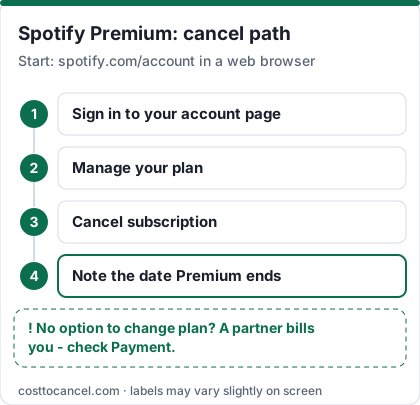
In the US (as of 2026-10-18), Spotify's Premium plans page lists Individual at $12.99/month, Duo $18.99, Family $21.99 and Student $6.99 (US list prices before tax). To cancel Spotify Premium, open your Spotify account page in a web browser, go to Manage your plan and select Cancel subscription; Premium stays until your next billing date, then the account switches to Spotify Free (Spotify Support: How to cancel Premium plans).
You keep your playlists and saved music on Free. If there's no option to change your plan, a partner such as your mobile or internet provider bills you - cancel with them.
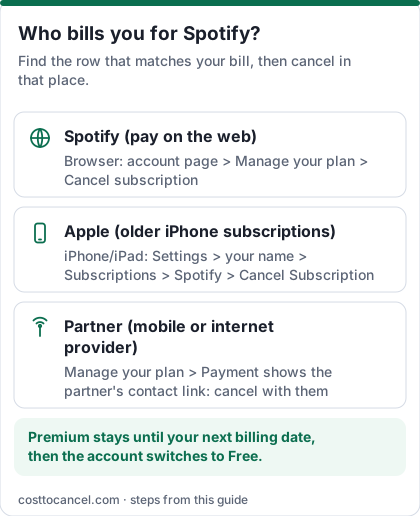
Spotify cancellation is simple when Spotify bills you and confusing when someone else does. The single most useful check: open Manage your plan and look at Payment. That line tells you which row of the table below applies.
Where to cancel (who bills you)
| Who bills you | Where to cancel | Official help |
|---|---|---|
| Spotify directly (card or PayPal on your Spotify account) | Account page in a browser > Manage your plan > Cancel subscription | Spotify: How to cancel Premium plans |
| Apple (older subscriptions bought in the iPhone app; statement says APPLE.COM/BILL) | iPhone Settings > your name > Subscriptions > Spotify > Cancel Subscription | Apple: Cancel a subscription |
| Partner (mobile carrier, internet provider or bundle) | Find the partner's contact link under Manage your plan > Payment, then cancel or remove the add-on with them | Spotify: How to cancel Premium plans |
Spotify Premium price tiers (October 2026)
| Plan | Price (US) | What you get |
|---|---|---|
| Premium Individual | $12.99/mo | 1 account; $0 for 1 month for eligible new users |
| Premium Duo | $18.99/mo | 2 accounts |
| Premium Family | $21.99/mo | Family accounts managed by one plan manager |
| Premium Student | $6.99/mo | Eligible students; $0 for 1 month for eligible new users |
| Spotify Free | $0 | Ads; playlists and saved music kept |
How to cancel Spotify Premium
On the web (any browser, including your phone's)
- Open a browser and sign in to your account page at spotify.com/account.
- Go to Manage your plan.
- Select Cancel subscription and confirm.
- Note the date shown - Premium stays until your next billing date.
If Apple bills you (older iPhone subscriptions)
- Open Settings on your iPhone or iPad and tap your name at the top.
- Tap Subscriptions.
- Tap Spotify.
- Tap Cancel Subscription (or Cancel Free Trial), then confirm.
If a partner bills you
- On your account page, go to Manage your plan and check Payment.
- Use the partner contact link shown there and cancel or remove the Spotify add-on with that company.
How to know it worked
You're done when:
- Manage your plan shows the date Premium ends (or Spotify Free once that date passes).
- No new Premium charge appears after that date from Spotify, Apple or your partner.
If you cancelled during a zero-priced free trial, Spotify switches you to Free immediately, and those trials can't be reactivated (Spotify Support). If you're a Family or Duo plan manager, members lose Premium from the next payment date.
If it didn't work
- There's no option to change or cancel the plan. A partner bills you. Find their contact link under Manage your plan > Payment.
- The page shows Spotify Free but you're still charged. Premium is probably on another Spotify account - sign in with your other email, Facebook, Apple or Google login and check there.
- You're a Family member, not the manager. Following the cancel steps removes *your* account from the plan but doesn't cancel it; ask the plan manager to cancel.
- The charge says APPLE.COM/BILL. Cancel in Apple Subscriptions, not on Spotify's site.
- You can't reach the account page. Spotify also accepts cancellation through a form linked from its cancel article.
What we verified
Verified on official Spotify pages (October 18, 2026): the cancel path (Manage your plan > Cancel subscription); Premium continuing to the next billing date; immediate switch to Free when cancelling a zero-priced trial; playlists and saved music kept; Family/Duo manager vs member behaviour; partner billing; the four US plan prices.
Not verified - left out: past price-increase dates and history (no official page checked); refund rules (Spotify's cancel article doesn't state a US refund policy, so we don't promise one); bundle perks such as streaming add-ons on Student; competitor prices; Google Play billing (Spotify's cancel article does not list it, so we left that route out).
If you're on Family or Duo
Only the plan manager can cancel. When the plan ends, managed accounts move to Spotify Free (members keep their own playlists). If you're a member, following the cancel steps removes your account from the plan without cancelling it for everyone else.
Refunds and disputed charges
Spotify's cancel article doesn't promise refunds for the current period - plan on keeping Premium until it ends. For a charge you don't recognise, first check other Spotify accounts and Apple or partner billing, then contact Spotify support or your card issuer.
Cheaper ways to keep listening
- Student at $6.99 if you're an eligible student.
- Duo or Family if you're paying for two or more Individual plans.
- Spotify Free still plays your playlists, with ads.
- Compare Apple Music and YouTube Premium on their official pricing pages.
Switching from Spotify to Apple Music
- Save a list (or screenshots) of the playlists you want to rebuild. If you use a third-party transfer tool, read its privacy policy first.
- Cancel Premium on your account page (or with Apple or Google Play if they bill you - see the table above).
- Start Apple Music around the date Premium ends, so you don't pay for both for a full month. Premium keeps working until then, and Spotify Free still plays your playlists afterwards.
- Family or Duo plan manager? Tell members before you cancel - the plan ends for everyone.
Apple Music prices and cancel steps: Apple One and Apple Music guide.
Frequently asked questions
Why can't I cancel Spotify in the app?
Spotify's help directs you to your account page (Manage your plan). Open it in any browser, including on your phone.
Do I lose my playlists if I cancel?
No. Spotify says you keep your playlists and saved music on the free plan, and you can still log in and play with ads.
Does Spotify charge a cancellation fee?
Spotify's cancel article doesn't mention any cancellation fee. Premium simply runs to your next billing date and then switches to Free.
Can I switch from Family to Individual?
Yes, from Manage your plan you can change plans instead of cancelling. Let members know first.